Similarly to the previous post, this blog post will continue to explore ideas for a companion app for the band, King Gizzard and the Lizard Wizard (KGLW), by introducing system maps and wireframes for the app whilst taking into consideration User Experience (UX) and User Interface (UI).
The next stage of this project was to create a user flow chart, however, to complete a user flow chart, the key features needed to be organised. At this point the key features list was:
- Upcoming shows
- Merch (shop)
- Social media
- Album info
- Releases
- Videos
- Bootlegger
- Previous tours
- Add your tour pics
- Newsletter subscription
- Request a show
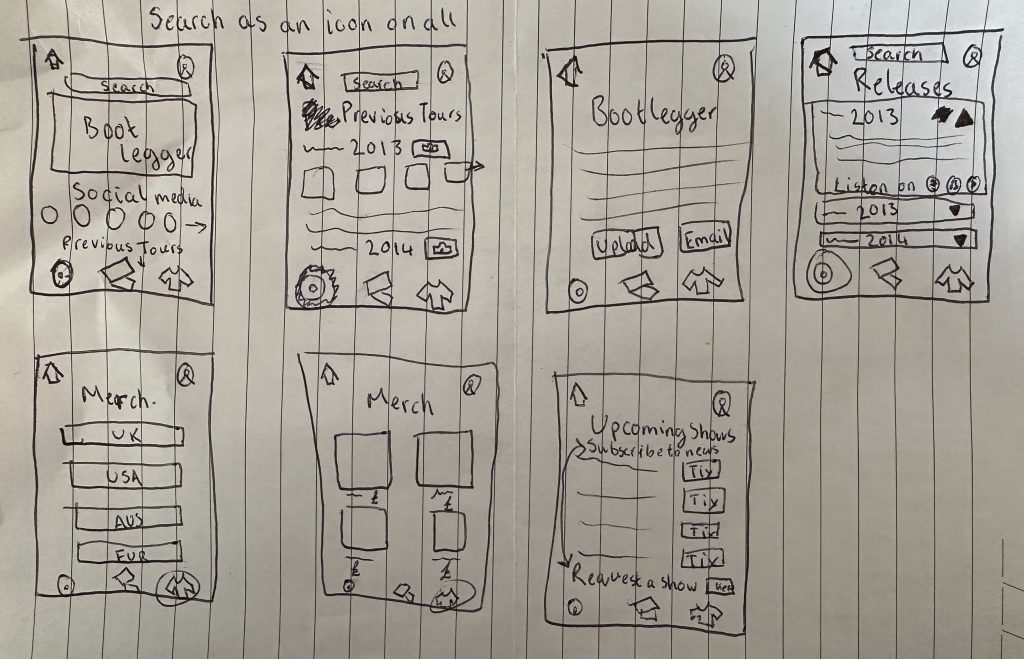
The above list was combined with the 8-minute sketch from the previous post. Incorporating all features into a maximum of 8 pages helped ensure the app was not overcomplicated. When creating the new sketches I was mindful to highlight important features and non-essential features were less visible. Please see below the updated sketch:
User Flow Chart
A user flow chart shows the path a user will take when using an application (app). There are several reasons for creating a user flow map in the development stage, they share product aims, lower the risk of errors, and encourage user-centred design (Product Plan, 2024).
Using Figjam I have created a user flow chart for the KGLW app (linked here), this user flow chart includes all the key features that were introduced in the ideation stage and shows all the possible user outcomes for the app.
Wireframe
The next step in the process was to create a wireframe/low fidelity prototype of the app. Wireframes help to ensure “focus is on the basic functionality” (Figma, 2024). To create the wireframe, I used Figma and based the screens off the sketched ideas and the user flow chart. At this point there was not many design elements included, other then a few pops of colour which will be incorporated to the final design to assist users in knowing which page they are currently on, additionally a wizard hat has been added to the account icon to link to the bands name. The link to my Figma wireframe can be found here.
The most important and useful features were included in the navigation bar, whilst other non-essential features were included within the pages.
References
Figma (2024) What is wireframing? Available online: https://www.figma.com/resource-library/what-is-wireframing/ [Accessed 9/5/2024].
Product Plan (2024) User flow. Available online: https://www.productplan.com/glossary/user-flow/#:~:text=A%20user%20flow%20is%20a,as%20few%20steps%20as%20possible. [Accessed 9/5/2024].